










How to make hidden doors in Minecraft
Two hidden doors tested in Java 26.3: a painting held up by signs, and a flush piston door that vanishes into the floor and wall, opened by an item frame.
On this page · 7
What you need
- Painting ×1
- Oak Sign ×2
- Sticky Piston ×2
- Redstone Dust ×11
- Redstone Comparator ×1
- Redstone Repeater ×1
- Lever ×1
- Item Frame ×1
- Bookshelf ×2
- Planks (any wood)= 9 logs, any wood ×34
- Redstone Dust ×19
- Sugar Cane ×18
- Cobblestone ×9
- Leather ×7
- Stone ×6
- String ×4
- Slimeball ×2
- Iron Ingot ×2
- Nether Quartz ×1


Gathered 0 / 9Raw = everything broken down with our recipes
Build a painting door for a hideout in two minutes, or a flush piston door when you want no visible gap at all. Both designs below were placed and switched on a Java Edition 26.3 server before we wrote this page.
Fill the doorway with two signs
Make a doorway 1 block wide and 2 blocks high in a wall. Stand inside the doorway and place an Oak Sign (any wood works) on the side wall of each of the two blocks, so each doorway block holds one wall sign. Leave the signs blank: press Escape or click Done.
A painting only stays up if every block behind it counts as solid. Air does not, signs do, and signs have no collision, so you can still walk through.
Hang the painting over the signs
Go back to the room side and place a Painting on the sign that faces you. The game picks at random among the largest paintings that fit the free wall around that spot. Any size works as long as it covers both doorway blocks; if it does not, break it and place it again.
Walk into the painting to pass through. It is not a lock: anyone who knows the trick, mobs included, can do the same.
Plan the flush piston door
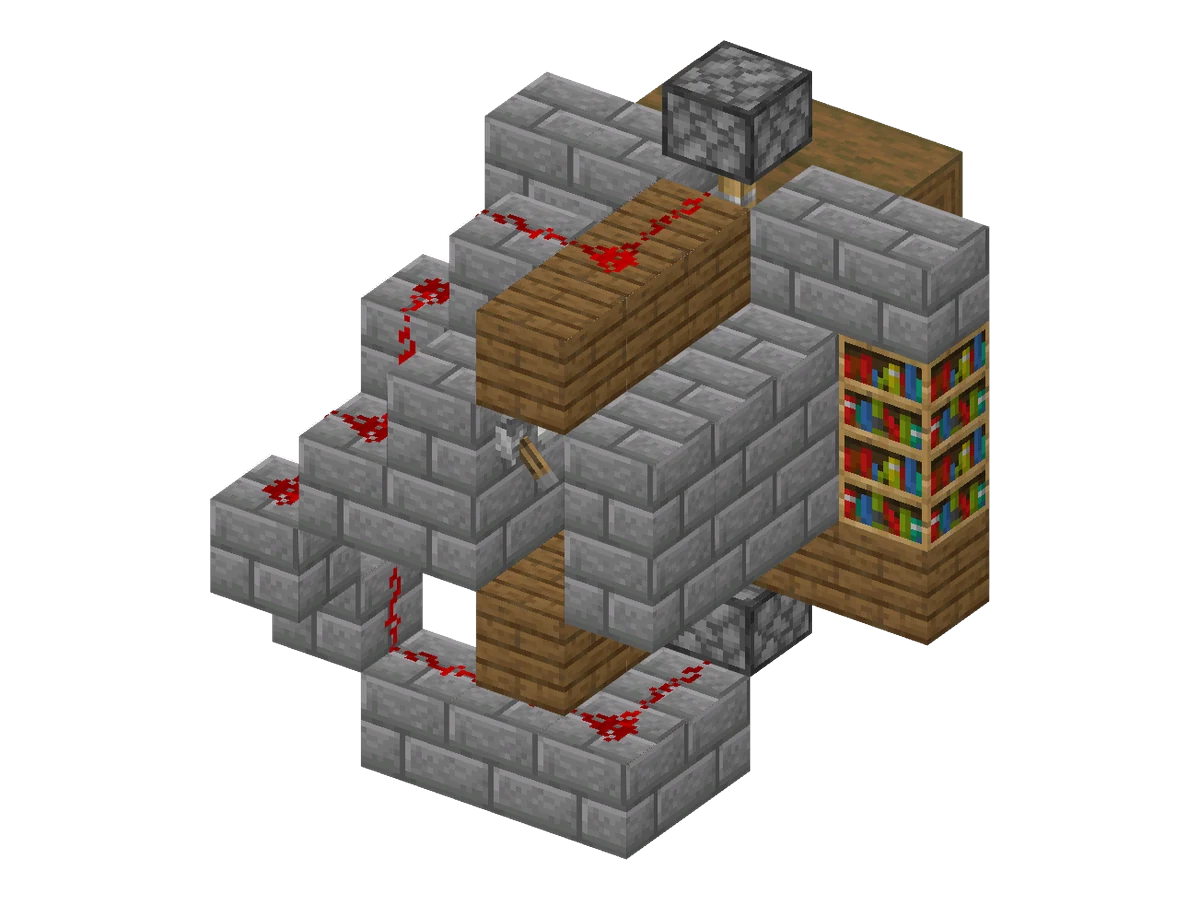
This door looks like a plain bookshelf wall. Closed, two Bookshelves fill the doorway. Open, the bottom one drops into the floor and the top one rises into the wall above, so the opening is a clean 1 by 2 gap. The plan below shows every block except the Item Frame, which you hang last.
Hidden flush piston door
- Size (W × H × D)
- 6 × 7 × 5
- Blocks placed
- 65
- Block types
- 9
- Layers
- 7
- Difficulty
- Easy
- Main material
- Stone
- All blocks since
- 1.13
- Survival
- Yes
- ID
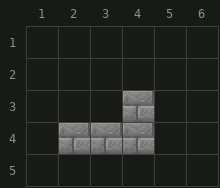

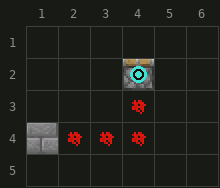
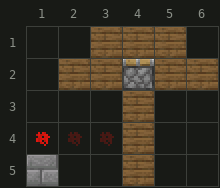

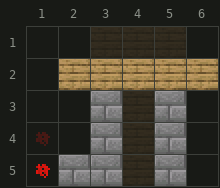
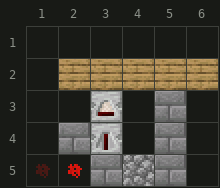
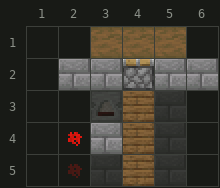

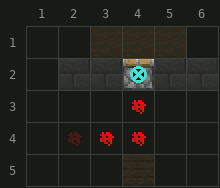


Orientation used below: the room is in front of the wall, the secret corridor is behind it, 1 block wide and 2 blocks high. Keep the room ceiling, or a beam, at the height of the top of the doorway: it hides the top piston.
Place the two Sticky Pistons
- Dig 2 blocks under the doorway floor and place a Sticky Piston facing up (layer 2 of the plan). Leave the block above it empty: the piston head goes there.
- Place the second Sticky Piston 2 blocks above the top of the doorway, facing down (layer 7). The block between it and the doorway stays empty too.
- Put the two Bookshelves in the doorway, one on top of the other.
Wire the key and the lever
- The Item Frame will hang at head height on the wall block to the right of the doorway, seen from the room. Behind that block, in the corridor wall, place a Redstone Comparator pointing away from the wall, then a Redstone Repeater in front of it, then a solid block (layer 5).
- Put the lever on the corridor side of that solid block. Comparator and lever both power it.
- From that block, lay Redstone Dust behind the corridor wall: one line climbs to the dust on top of the corridor ceiling, which ends against the back of the top piston (layers 5 to 7). The other line steps down to the dust under the corridor floor, which ends against the back of the bottom piston (layers 1 to 4).
- Each step of a dust stair needs a solid block under the upper dust and air above the lower dust. The plan shows the exact cells.
The comparator reads the Item Frame through the wall block, but an item frame only gives a signal of 1 to 8, which dies after a few dust. The repeater brings it back to 15.
Hang the Item Frame and test it
- Hang the Item Frame on the room side of the wall block right of the doorway, at head height, and put any item in it. Both pistons push: the door closes.
- Take the item out: the pistons pull the Bookshelves into the floor and the wall. Put it back to close.
- From the corridor, the lever does the same job: on keeps the door shut, off opens it. The door stays shut while either the frame holds an item or the lever is on.
Java and Bedrock
Both doors were built and switched on Java Edition 26.3. We have not tested them on Bedrock Edition, where paintings and comparators follow their own rules: try them in a creative world before building in survival.
FAQ
Why does my painting pop off the doorway?
Every block behind a painting must count as solid. Air does not, so fill both doorway blocks with signs: signs count as solid for paintings but have no collision.
Can mobs walk through a painting door?
Yes. Neither the painting nor the signs block movement, so zombies can follow you. Light the room so none spawn nearby.
How do I open the piston door from the inside?
Use the lever in the secret corridor. The door stays shut while the lever is on or the frame holds an item, so turn the lever off to open it, then back on behind you.
Does this work on Bedrock Edition?
We built and tested both doors on Java Edition 26.3 only. Paintings and comparators have their own rules on Bedrock, so try the build in a creative world first.
Blocks & items in this guide
9 · recipe, drops and data for each Painting
 Item Frame
 Lever
 Sticky Piston
 Oak Sign
 Bookshelf
 Redstone Comparator
 Redstone Repeater
 Redstone Dust