










How to build a 2x2 piston door in Minecraft
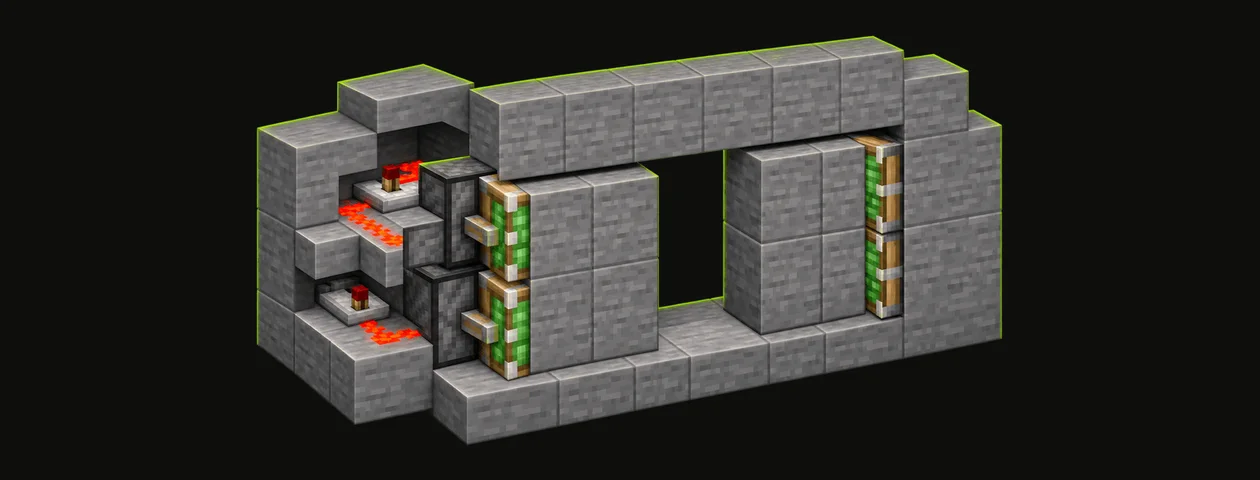
A 2 by 2 sticky piston door that opens from pressure plates on both sides, tested on a Java 26.3 server, with a 3D plan to copy layer by layer.
On this page · 7
What you need
- Sticky Piston ×4
- Redstone Torch ×2
- Redstone Dust ×12
- Stone Pressure Plate ×4
- Stone Bricks ×4
- Redstone Dust ×18
- Cobblestone ×16
- Planks (any wood)= 4 logs, any wood ×13
- Stone ×12
- Slimeball ×4
- Iron Ingot ×4


Gathered 0 / 5Raw = everything broken down with our recipes
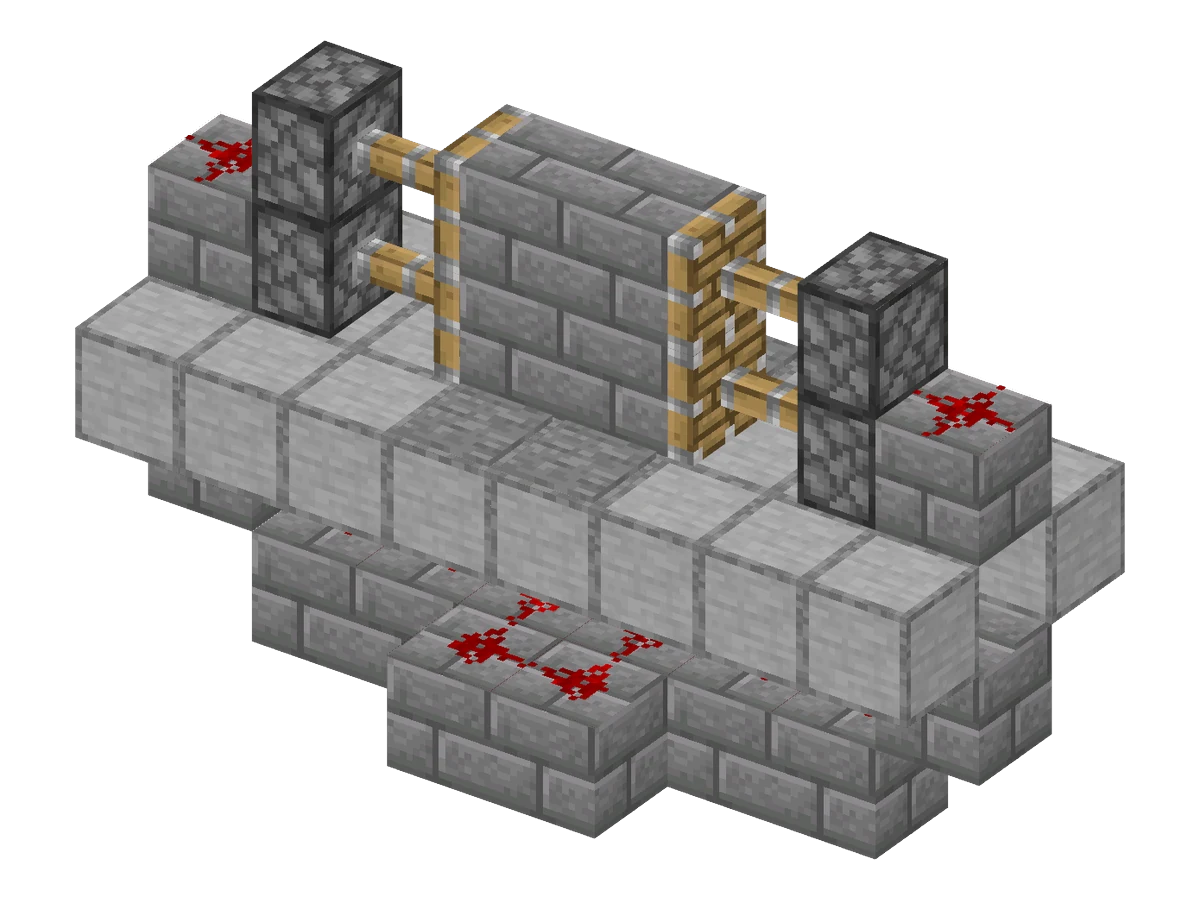
This is the classic flush 2 by 2 door: closed, it looks like a solid wall; step on a plate and four blocks slide into the walls. We built it from the plan below on a Java Edition 26.3 server and opened it from both sides before writing this guide.
2×2 piston door
- Size (W × H × D)
- 8 × 5 × 3
- Blocks placed
- 62
- Block types
- 6
- Layers
- 5
- Difficulty
- Easy
- Main material
- Stone
- All blocks since
- 1.12.2
- Survival
- Yes
- ID
Layer by layer
Seen from above, north at the top. The layer below shows faded.
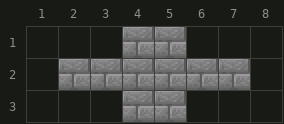
 Stone Bricks× 10
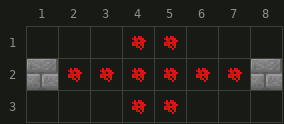
 Redstone Dust× 10
- Stone Bricks× 2
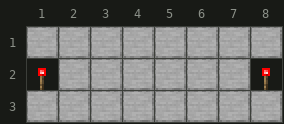
 Smooth Stone× 22
 Redstone Torch× 2
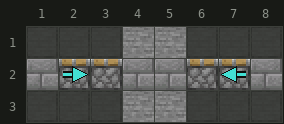
 Stone Pressure Plate× 4
- Stone Bricks× 4
 Sticky Piston× 2
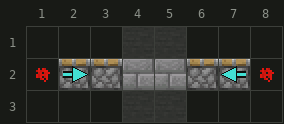
- Redstone Dust× 2
- Sticky Piston× 2
- Stone Bricks× 2
- NNorth is up
- Stairs: the arrow points to the tall side
- Hollow arrow: upside-down stairs
- Corner mark: slab in the top half
- Faded: layer below
- Blue arrow: way the part faces (piston pushes, observer watches, hopper empties, repeater and comparator send the signal); dot: up, cross: down
Materials
Stone Bricks 18 Redstone Dust 12 Stone Pressure Plate 4 Sticky Piston 4 Redstone Torch 2 62 items · 6 inventory slots · 1 Shulker box

94 items · 6 inventory slots · 1 Shulker box
// Estimated from the crafting recipes, rounded up. Glass, stone and smooth blocks are traced back to what you smelt.
Get it in your world
/place template blockaria:piston_door_2x2 ~ ~ ~Places the build with its north-west bottom corner at your position. Needs cheats (permission level 2).
/place template blockaria:piston_door_2x2 ~ ~ ~ clockwise_90Structure file (.nbt) for Java Edition. Put it in saves/<world>/generated/blockaria/structure/, then run the command above or load it with a Structure Block.
Orientation used below: the doorway is 2 blocks wide and 2 blocks high, in a wall that runs left to right. The plan has 5 layers, from 3 blocks under the floor up to the top of the doorway.
Dig out the floor under the door
Mark the doorway, then dig the floor out to 3 blocks deep along the wall line, from 3 blocks left of the doorway to 3 blocks right of it, and under the 2 blocks in front of and behind the doorway (layers 1 and 2 of the plan).
Lay the dust under the floor
- On the bottom layer, place a row of solid blocks under the wall line and under the plate spots (layer 1).
- Put Redstone Dust on top: a line of 6 under the wall line, from 2 blocks left of the doorway to 2 blocks right of it, plus one dust under each of the 4 plate spots (layer 2).
- At both ends of the line, one more block further out, place a solid block at the same height as the dust. The end of each dust line points into it.
Place the two Redstone Torches
Stand a Redstone Torch on top of each of those two end blocks (layer 3). They will sit in the floor, right under the block that goes behind the bottom pistons. A lit torch powers the block above it. When a plate powers the dust, the dust powers the end block and the torch on it turns off.
Close the floor
Fill the rest of the floor back in around the torches (layer 3), at the same height as the floor of the room. Leave the torches where they are: the block placed above each one hides it.
Build the piston columns
- On each side, one block away from the doorway, stack two Sticky Pistons with their heads facing the doorway (layers 4 and 5). A piston's head points toward you when you place it, so stand in the doorway.
- Behind each bottom piston, right on top of the torch, place a solid block.
- Put one Redstone Dust on that block, next to the top piston. Leave it as a cross: a cross powers all four sides.
The torch powers the block above it, that block pushes the bottom piston, and the dust on it pushes the top piston. All four pistons extend as soon as the torches are lit.
Add the door blocks and the plates
- Place 4 blocks in the doorway, against the piston heads. Use the same block as your wall; pistons cannot move Obsidian, chests or other blocks that pistons refuse.
- Put a Stone Pressure Plate on each of the 2 floor blocks in front of the doorway and the 2 behind it.
- Step on a plate: the pistons pull the blocks into the walls. Step off: the door closes about a second later.
Do not stop inside the doorway: the closing blocks push you out.
Java and Bedrock
The door uses no quasi-connectivity and no 0-tick pulse, the two mechanics that usually break Java doors on Bedrock Edition. We tested it on Java Edition 26.3 only, so build a test copy in creative before using it on Bedrock.
FAQ
Why do my pistons stay retracted?
The torches power the pistons. Check that each Redstone Torch stands on its block, directly under the block behind the bottom piston, and that the dust on top of that block is a cross, not a dot.
Why does the door not close after I walk through?
A pressure plate stays down while something stands on it and checks again every 20 game ticks. If a mob or a dropped item lies on a plate, the door stays open.
Can I use buttons or a lever instead of plates?
Yes. Anything that powers the dust under the floor works. A lever keeps the door open as long as it is on; a stone button opens it for 1 second.
Does this door work on Bedrock Edition?
It uses no quasi-connectivity and no 0-tick pulse, which are the usual reasons a Java door fails on Bedrock. We tested it on Java Edition 26.3 only, so try it in a creative world first.
Blocks & items in this guide
7 · recipe, drops and data for each- Redstone Dust
- Redstone Torch
- Sticky Piston
- Stone Pressure Plate
- Stone Bricks
 Obsidian
 Chest