Blocks
Concrete and Glazed Terracotta
Two new families of coloured building blocks: Concrete, which comes from Concrete Powder, and Glazed Terracotta with patterned faces.
Released on 18 September 2017, Minecraft Java Edition 1.12.2 is the final release of World of Color (1.12). It fixes a multiplayer exploit and other bugs, and updates the in-game logo. It runs on Java 8 and remains a popular base for large Forge mods and modpacks.
The changes you will notice first, with the pages that go deeper.
Two new families of coloured building blocks: Concrete, which comes from Concrete Powder, and Glazed Terracotta with patterned faces.
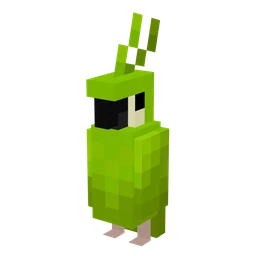
Parrots are the new mob of World of Color. They live in jungles and can be tamed with seeds.
The recipe book shows the recipes you have unlocked, and the Knowledge Book can unlock more. Advancements replace achievements, and map makers can create their own for adventure maps and mini-games.
Mods must be rebuilt for each version. Counts from the files published on Modrinth and CurseForge, in our catalog.
179 mods in our catalog have a 1.12.2 file → 85 texture packs and 56 maps in our catalog support 1.12.2. →Open the Minecraft Launcher and select Minecraft: Java Edition.
Go to Installations, create a new installation and choose version 1.12.2.
Back up your worlds before opening them in a new version.
0 snapshots, 2 pre-releases and 0 release candidates over 5 days.
On 18 September 2017. It is the final release of World of Color, which launched as 1.12 on 7 June 2017. The next major version was 1.13.
Java 8. The official launcher installs and uses its own Java 8 runtime for this version.
Many large Forge mods and modpacks were built for 1.12.2, and some were never ported to later versions. A mod only loads on the game version it was built for, so players stay on 1.12.2 to keep playing them.
Yes. 1.12.2 adds no content but fixes a multiplayer exploit and other bugs, which matters most for servers.