










How to equip or change your cape in Minecraft
Pick a cape in the Minecraft Launcher or the Bedrock Dressing Room, check it in third person and see how it looks on elytra.
On this page · 6
Owning a cape is not enough: it has to be equipped on your account before other players can see it. The steps differ between Java Edition and Bedrock Edition.
Equip a cape in the Minecraft Launcher
- Open the Minecraft Launcher and select Minecraft: Java Edition.
- Go to the Skins tab.
- Edit the skin you use, or select New skin.
- In the Cape section, select the cape you want, then click Save & Use.
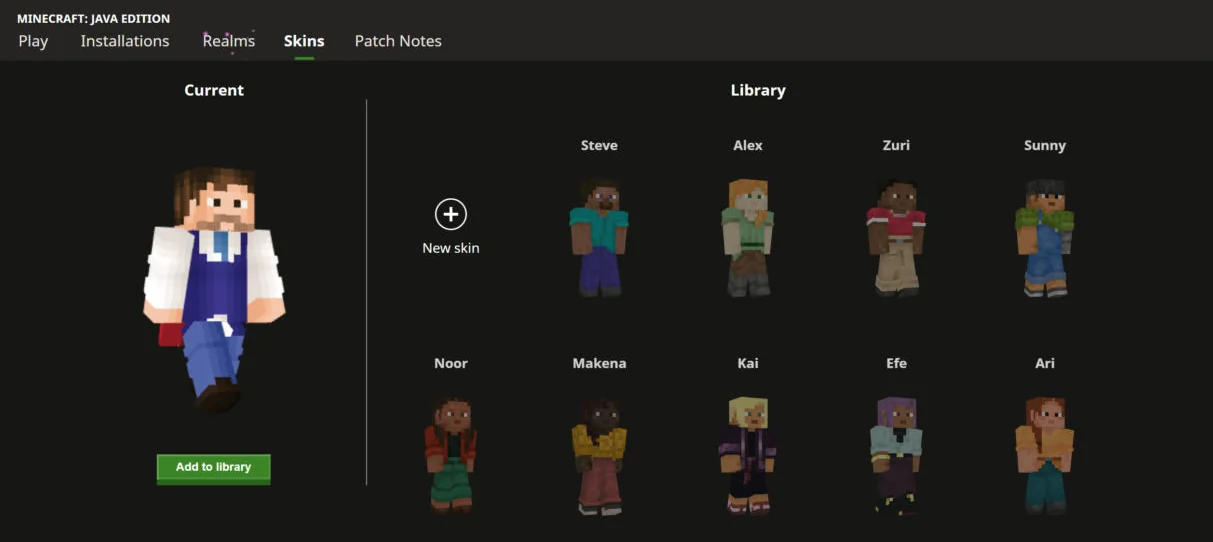
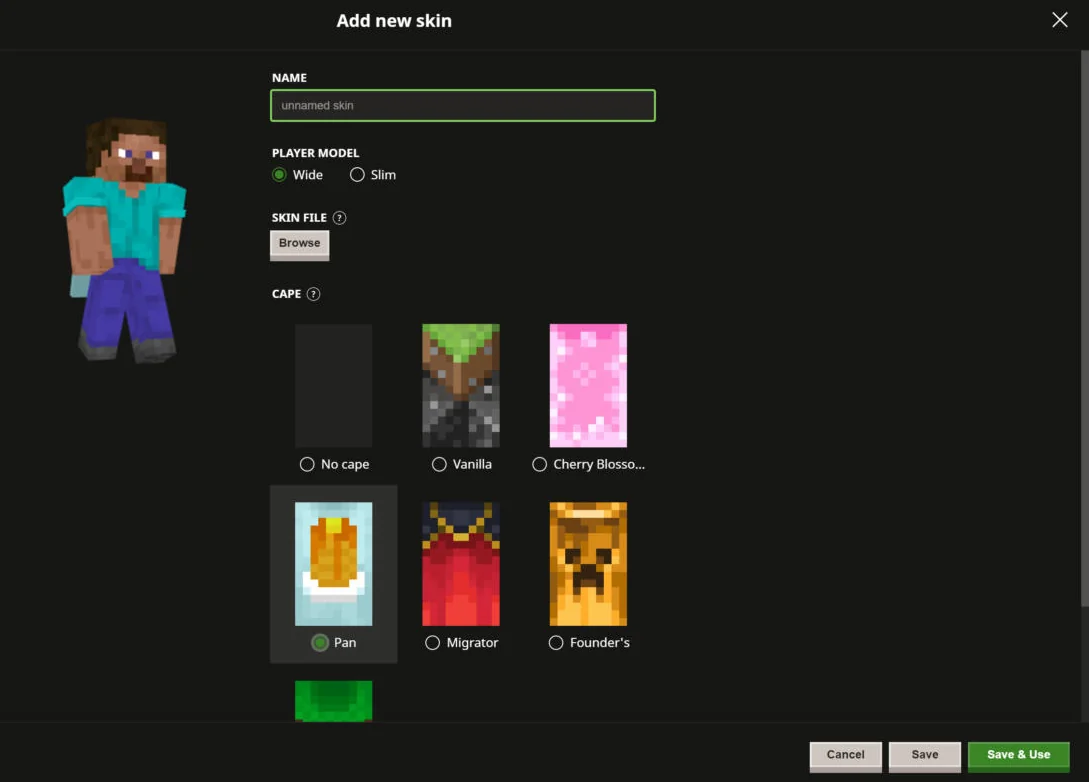
The change applies to your account, so it follows you on every computer and server.
Or change it on minecraft.net
Sign in on minecraft.net with your Microsoft account, open your profile, choose Minecraft: Java Edition and edit your skin. The same cape list appears below the skin options. This is handy when you are away from the computer you play on.
Make sure the cape is not hidden
Java Edition can hide your cape on your own screen. In game, open Options, then Skin Customization, and check that Cape is ON. Press F5 to switch to third-person view and look at your back. With OptiFine installed, also check Video Settings, then Details, then Show Capes.
Equip a cape in Bedrock Edition
- From the main menu, open the Dressing Room.
- Select your character, then the Capes section in the left menu.
- Pick a cape and select Equip.
Java and Bedrock keep separate choices: equipping a cape on one edition does not change the other.
See your cape on elytra
When you wear elytra, they take the design of your cape. Switch the view below between Cape and Elytra to compare.
The Minecraft Live 2023 cape, linked to the mob vote.
First given : 13 Oct 2023
Open the cape page →Check what other players see
Type your username in the checker below: it shows the cape Mojang's servers send for your account. If it differs from what you picked, wait a minute and check again, or read why a cape is not showing.
Type a Java Edition username to see the skin and the cape Mojang’s servers actually send to other players.
Only the cape currently equipped is public. Data from Mojang, through PlayerDB when Mojang’s API is unavailable, cached for 5 minutes.
FAQ
Can I wear two capes at once?
No. You can own many capes but only one is equipped at a time, and it is the one other players see.
Why do I see my cape but my friend does not?
Other players get your cape from Mojang's servers. On some servers and with some mods it cannot be loaded; see the cape troubleshooting guide.
Does a cape change my elytra?
Yes. Elytra use the design of your equipped cape. With no cape equipped, they keep their default grey look.
Blocks & items in this guide
2 · recipe, drops and data for each Elytra
 Bedrock